Experimenting with DNS part 1: Deploying Hugo blog to Vercel with custom domain
I bought my first domain name this month: putnam.computer! I used Porkbun for this, because their prices are low and they provide a lot of useful features for free, such as SSL encryption. There’s nothing on putnam.computer at the moment, but I’m working on a portfolio page that I hope to host there soon. I do have this blog hosted on one of the subdomains though, and a number of other services hosted on other subdomains on my local network, which I aim to write about for part 2 of this post. For now, I’ll get into how I deployed this blog.
Deploying Hugo to Vercel
Vercel is a hosting platform that allows free custom domains on its Hobby plan, and it provides Hugo support out of the box. All I had to do was follow this official guide. There were a few things I had to debug to get the deployment to work properly:
- At first, the Vercel CLI didn’t recognize my blog as a Hugo blog, because its main configuration file was named
hugo.toml. I renamed it toconfig.tomland this solved the problem. - When I deployed the website, the CSS wouldn’t load at first, because the browser didn’t recognize where the CSS script was coming from and blocked it. I set
baseURL = "https://blog.putnam.computer/"inconfig.toml, and this updated the script’s origin and fixed the issue. - I set an environment variable in Vercel to designate the version of Hugo I was using. This was crucial so that the website would build successfully when deploying. I did this by clicking on my blog project in the Vercel dashboard, going to Settings > Environment Variables, creating a variable called HUGO_VERSION, and entering the Hugo version number. In my case, this was 0.146.5.
Adding a Custom Domain
I used this guide to set my blog’s domain name.
This is a screenshot of the matching DNS records I set up on Porkbun:
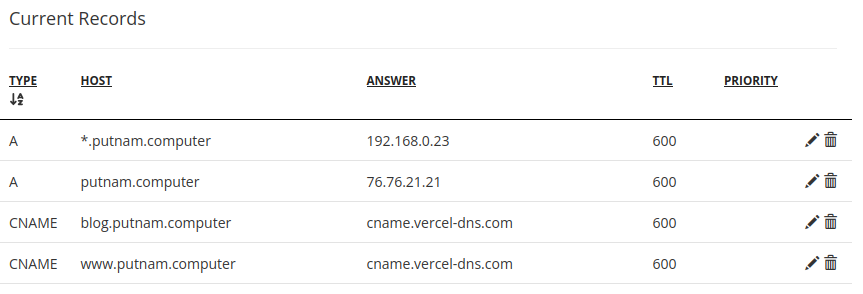
I have putnam.computer set up as an apex domain pointing directly to Vercel’s servers. Since blog.putnam.computer is a subdomain, I have it set up as a CNAME record that redirects to putnam.computer. Each domain is assigned to the Domains section of its corresponding project on Vercel. This way, Vercel automatically knows which project to display when each domain is entered in the browser (my blog at blog.putnam.computer, and my portfolio website at putnam.computer.)
Vercel recommends adding www.putnam.computer and redirecting putnam.computer to it, so I have that set up as well. (Vercel explains their reasoning for this here.)
You’ve probably noticed by now that the first record in the list is not pointing to Vercel. *.putnam.computer is a wildcard record that contains all of the subdomains I’ve assigned to the services on my home server. I’ll cover this in part 2 of this post. Until next time :-]